LinkedIn in the DACH Region: Why You Don’t Exist for Recruiters Without a Profile – and How to Change That
April 9, 2026A practical guide for anyone looking to establish themselves in the German-speaking world
Introduction: You’re Here – But Nobody Sees You
Imagine this: you have a strong résumé, relevant experience, and real motivation. You apply. You wait. Silence.
The problem often isn’t you – it’s your invisibility.
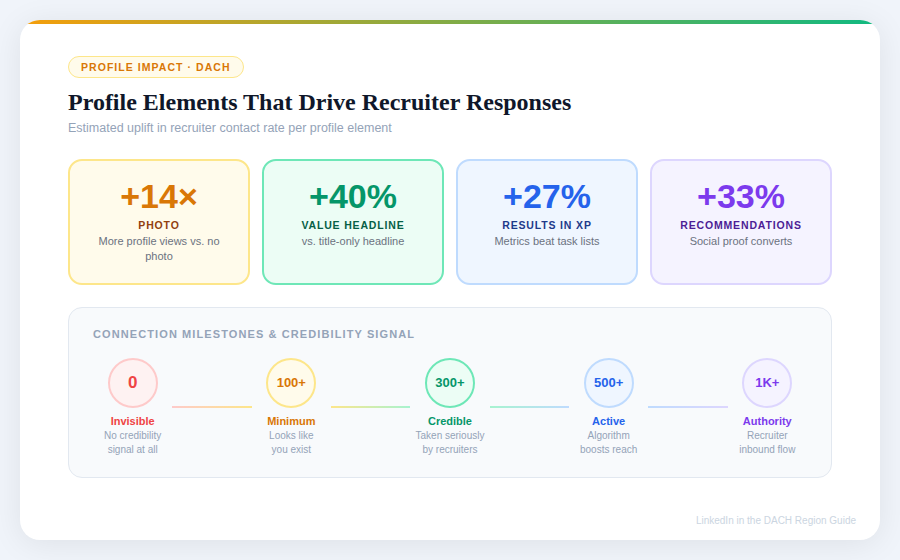
According to current data, over 90% of recruiters in the DACH region* actively use LinkedIn to search for candidates. Many check an applicant online before confirming a job interview. Anyone who doesn’t show up there comes across – fairly or not – as less professional.
LinkedIn is not simply a digital résumé. It’s your permanently running personal PR tool. And in this article, you’ll learn how to use it properly.
*DACH region – DE (Deutschland), A (Austria – Österreich) und CH (Confoederatio Helvetica – Schweiz)
1. LinkedIn in the DACH Region ≠ LinkedIn in the USA
This is a crucial difference that many people overlook.
In the US, LinkedIn is loud and boisterous: motivational posts, success stories, self-promotion in capital letters. In the DACH region, things work differently.
Here, the rules are:
Less noise – the platform is quieter, cleaner, calmer
More substance – recruiters actually read profiles thoroughly
Structure and facts matter more than self-congratulation
Personal, authentic content is valued – but with substance, not hype
What About XING?
XING was long the number one platform in the German-speaking region. Those days are over.
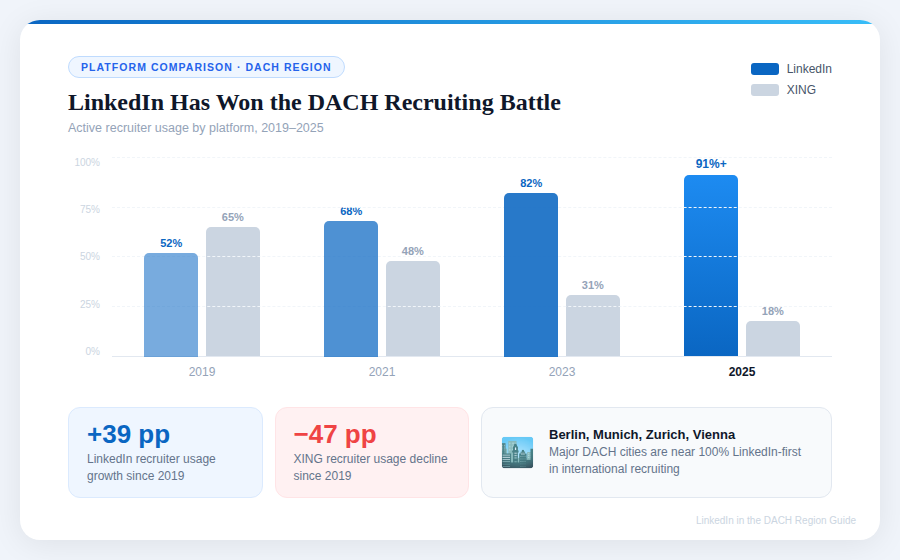
International companies, startups, and increasingly the traditional Mittelstand have switched to LinkedIn. XING is continuously losing users and, above all, active recruiters. Anyone who wants to seriously advance their career today – especially in Berlin, Munich, Zurich, or Vienna – must be present on LinkedIn.
Especially Important for Migrants and Career Changers
If you’re new to the country, you don’t have an established local network. LinkedIn can partially compensate for that. It makes you visible – even to people you don’t yet know but should.
2. What a Recruiter Actually Sees – and Thinks
Before we talk about profile design, it’s worth understanding the other side of the equation.
Here’s how a typical candidate search works:
- The recruiter enters search terms: job title, skills, location, language
- They filter by experience level and availability
- They see a list of profile previews: photo, name, headline, current job
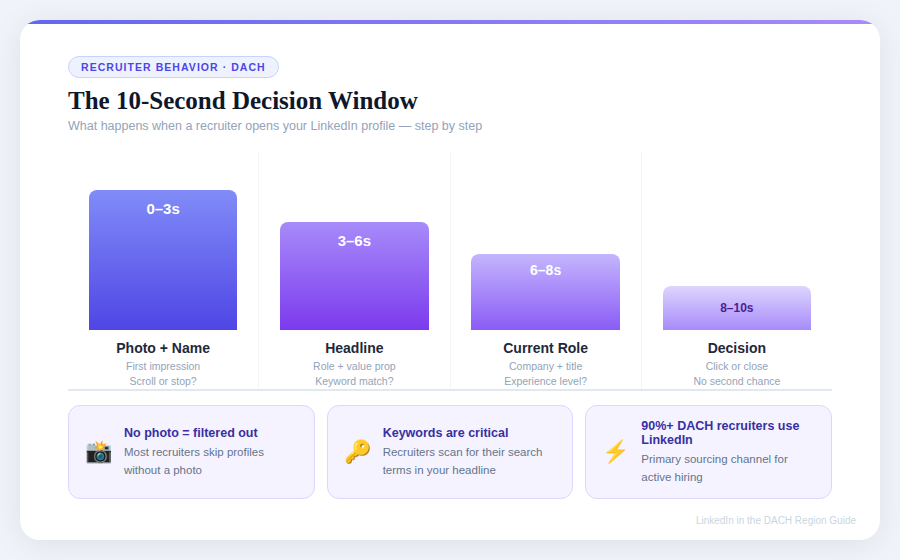
- They have 5–10 seconds per profile
In those 10 seconds, they decide: click or keep scrolling.
What makes them click:
- A clear, professional photo
- A headline that immediately shows who you are and what you can do
- Recognizable keywords from their search
What makes them close:
- No photo
- Headline = just a job title
- Profile inactive for months
- Gaps without context
The takeaway: Your LinkedIn profile is not a form you fill out. It’s marketing.
3. CV vs. LinkedIn: The Key Difference
Many people think LinkedIn is simply a digital résumé. That’s a mistake.
| CV (Résumé) | ||
|---|---|---|
| Purpose | Formal document for a specific role | Ongoing personal marketing tool |
| Tone | Factual, precise | Personal, authentic, active |
| Updates | As needed | Continuously |
| Reach | One person | Thousands of people simultaneously |
| Dynamic | Static | Interactive (comments, recommendations, networking) |
Both need each other – but they don’t replace each other. The CV opens the door. LinkedIn makes recruiters knock before you’ve even applied.
4. Filling Out Your Profile Correctly: Step by Step
Photo
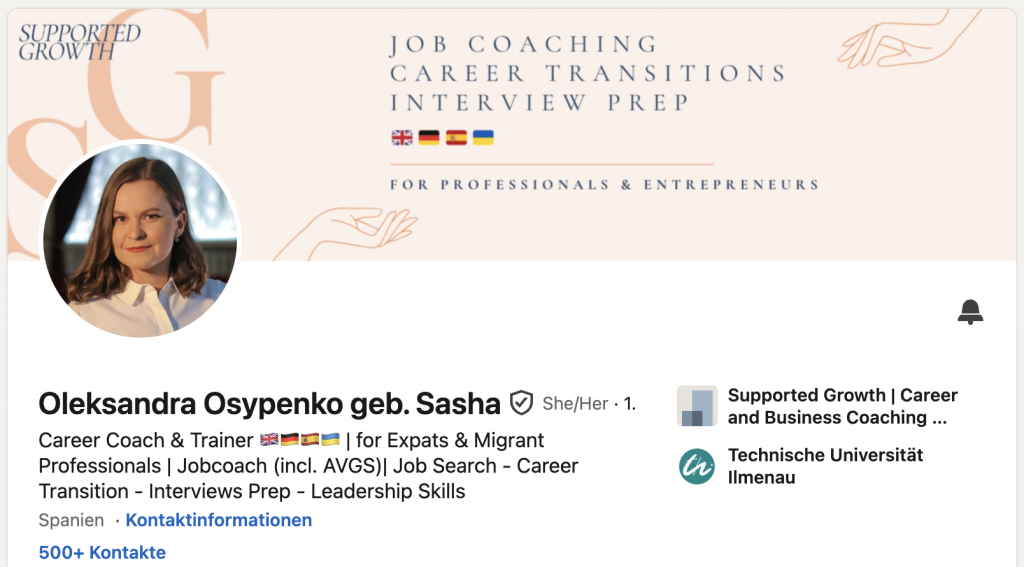
Your photo is your first impression. No selfies, no vacation photos, no passport-style headshots.
- Neutral or bright background
- Your face takes up 60–70% of the image
- Friendly, natural expression
- Business-casual is perfectly fine
No photo = invisibility. Many recruiters automatically filter out profiles without a photo.
Headline
The headline is the most important thing after your photo. It appears everywhere: in search results, on comments, in network suggestions.
Wrong: Marketing Manager at XYZ GmbH
Right: Career Coach & Trainer 🇬🇧🇩🇪🇪🇸🇺🇦 | for Expats & Migrant Professionals | Jobcoach (incl. AVGS)| Job Search - Career Transition - Interviews Prep - Leadership Skills
Your headline should show: who you are, what you can do, and what value you bring.
Banner

The default grey banner is a missed opportunity. Use it for personal branding: your area of expertise, a short message, a visual element that represents you.
About Section
The first two to three lines are decisive – everything after that is hidden behind a “see more” button.

Start with a strong opening:
- A concrete statement about what you do
- A result or context that sparks curiosity
- Not a self-promotional hymn, but a clear positioning
The rest of the About section can be more personal: your journey, your motivation, what drives you.
Work Experience
This is where most people make the same mistake: they list what they did – not what came of it.
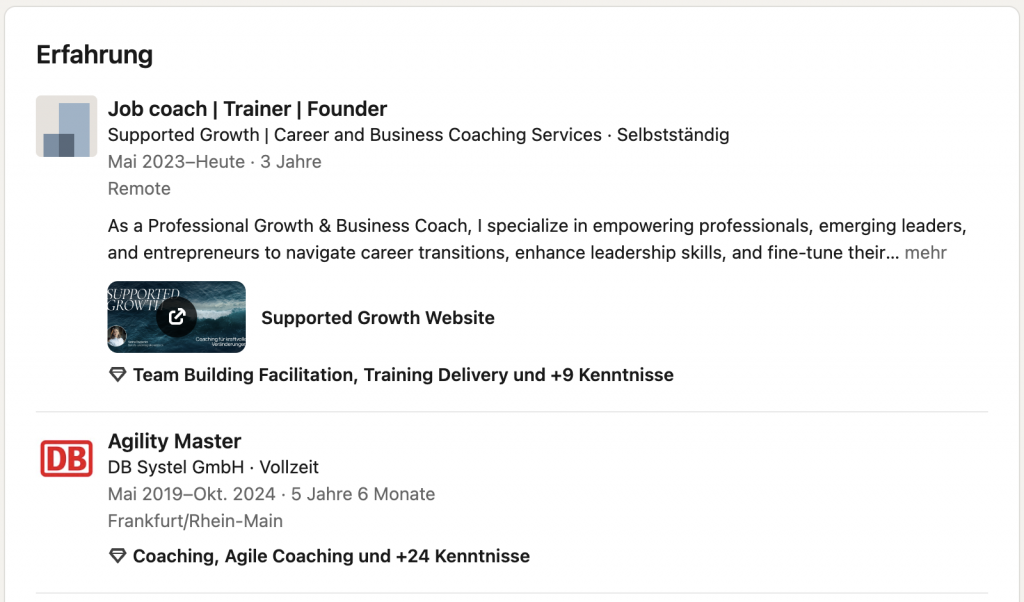
Wrong: Responsible for social media channels
Right: Grew Instagram presence from 0 to 12,000 followers in 8 months, reach +340%
Numbers, results, context. This speaks directly to recruiters and hiring managers.
Skills & Endorsements

Choose your skills strategically – not all of them, but the most relevant ones for your target field. Endorsements from others increase credibility and improve your findability.
Recommendations
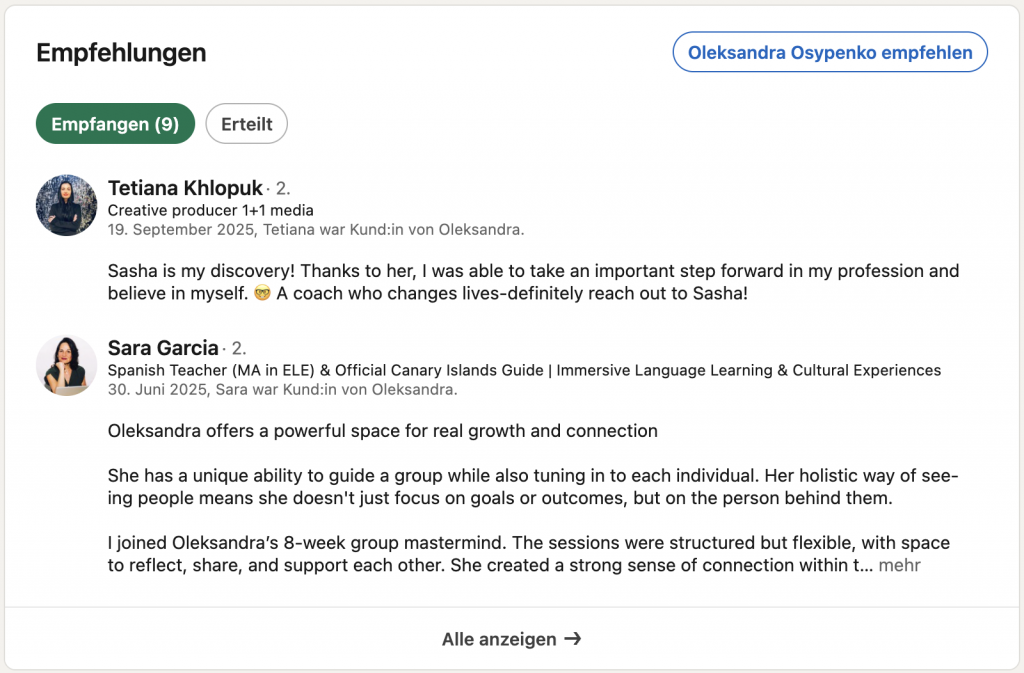
The most underestimated section. An honest recommendation from a former manager or colleague is worth more than any self-description.
How to ask properly: personally and specifically. Briefly explain what you’d appreciate them writing about. Make it easy for them.
Vanity URL
By default, your LinkedIn URL looks messy. Customize it:
linkedin.com/in/oleksandra-osypenko
– simple, professional, easy to share.
4a. “Add Section” – the Underrated Control Center of Your Profile
Most people only use the standard sections: photo, headline, experience. But LinkedIn offers a range of features via the “Add section” button (at the top of your profile) that can set your profile clearly apart from the crowd.
Featured
The “Featured” section appears directly below your About section – one of the most clicked spots on your profile. Here you can strategically place what you want to highlight:
- Website or portfolio link – directly linked, no searching required
- Your own LinkedIn articles – pin your best pieces permanently to the top
- Posts that went viral – preserve reach instead of letting it fade
- Documents and presentations – e.g. case studies, project overviews, whitepapers
- Certificates or external media coverage – proof that backs up your expertise
In short: “Featured” is your personal shopfront. If you have a portfolio, a strong article, or a website – this is where it belongs. Recruiters see it immediately.
Other Useful Sections You Can Add
- Projects – ideal for career changers or freelancers who want to show concrete results even without traditional work experience
- Honors & Awards – prizes, scholarships, recognitions that would otherwise get buried in a résumé
- Volunteer Experience – in the DACH region, social engagement is viewed very positively
- Courses & Certifications – especially relevant for people actively upskilling or entering a new field
- Publications – for anyone who has published specialist articles, books, or studies
- Languages – a genuine differentiator in the German-speaking market, especially at international companies
Tip: Go into your profile now, click “Add section,” and check what you haven’t filled in yet. Every completed section is an additional signal to the LinkedIn algorithm – and to the recruiter.
5. LinkedIn SEO: Google Lives Inside the Platform Too
LinkedIn works like a search engine. Recruiters enter keywords – and whoever has those keywords in the right places gets found. Those who don’t stay invisible.
Which Keywords?
- Job titles: the exact designation used in searches in your industry
- Tools and platforms: e.g. Google Ads, Salesforce, Python, SAP
- Skills: both hard and soft competencies typical for your field
Where to Place Them?
- Headline – the strongest ranking factor
- About section – woven in naturally, not like a keyword list
- Work experience – within the descriptions of individual positions
Open to Work: Yes or No?
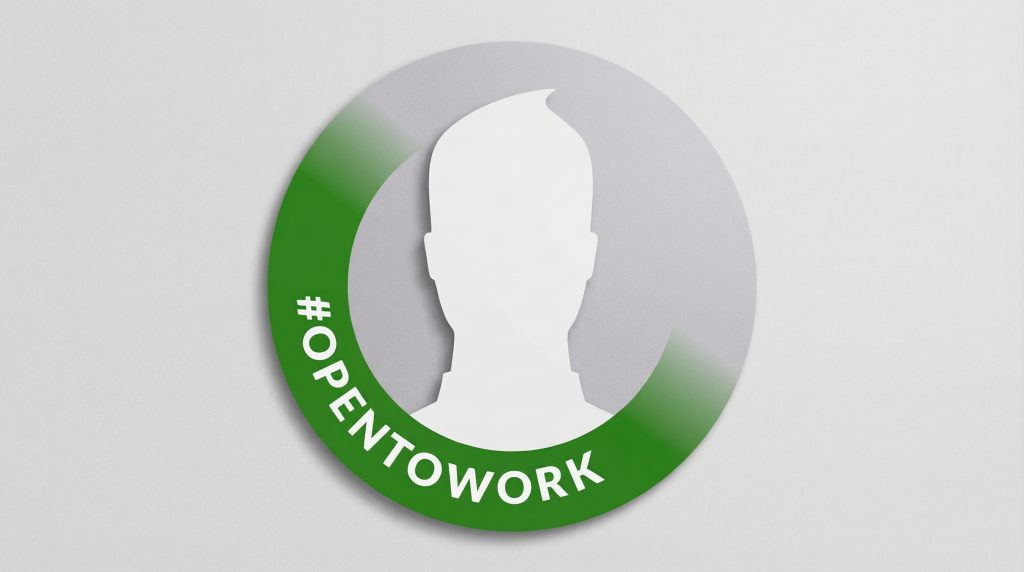
The green frame is visible to everyone – including your current employer. LinkedIn offers an alternative: the setting “Visible to recruiters only.” This is far more discreet and usually the better choice.
Privacy Setting: Anonymous Browsing
When viewing the profiles of recruiters or hiring managers, you can do so in private mode – so you can see who is active in your industry without appearing on their radar yourself. Find it under: Settings → Visibility → Profile viewing options.
6. LinkedIn as a Funnel – Not Just a Business Card
This is where it gets strategic. Most people use LinkedIn passively: create a profile, wait, hope.
Effective use looks different:
PROFILE → Build trust
CONTENT → Generate attention
MESSAGES → Conversion (conversations, interviews, offers)
A well-maintained profile alone is not enough. It’s the starting point – not the goal. What really moves you forward is activity: being visible, providing value, building connections.
7. Content Strategy: Visibility Through Content
Why “Just Being There” Isn’t Enough
The LinkedIn algorithm favors active users. Those who post, comment, and interact appear more frequently in others’ feeds – even without paid advertising.
What Works in the DACH Region
- Personal stories instead of corporate-speak
- Lessons learned from failures – more authentic than success stories and significantly higher in reach
- Insights from your field – show that you know what you’re talking about
- If you’re currently job hunting: share your process – what you’re learning, what surprises you, what you’re struggling with. This generates resonance.
Formats
- Text posts – personal, direct, often the most powerful
- Carousels – very effective for structured content and how-tos
- Videos – still underused in DACH, so great for grabbing attention
- LinkedIn Articles (long-form) – the most underestimated content type. More on this below.
LinkedIn Articles: Double Reach – On the Platform and on Google
LinkedIn articles are not posts – they are fully indexed web pages. And that makes them one of the most powerful tools the platform offers.
Why? Because Google and AI systems actively index LinkedIn articles and prioritize them in search results and AI-generated answers. A well-written specialist article on LinkedIn can show up on the first page of Google for relevant queries – or be cited as a source in an AI summary.
What this means in practice:
- You write an article on “Employer Branding in the Mittelstand” or “What Makes a Good UX Designer” – and become visible beyond LinkedIn
- Recruiters and hiring managers who Google you find substantive proof of your expertise – not just a profile
- AI-powered search (Google AI Overviews, Perplexity, ChatGPT with web browsing) cites such articles as reliable specialist sources
What makes a good LinkedIn article?
- A clear, search-engine-friendly title (one that answers a real question)
- 600–1,500 words – long enough for substance, short enough to stay readable
- Structured with subheadings
- Based on real experience or genuine expertise – not generic half-knowledge
- At the end: a concrete recommendation or question for readers
Tip: Pin your best article in the “Featured” section (see Section 4a). That way it lands directly in the eye line of every profile visitor.
Frequency
Two posts per week, consistently, is better than ten posts in one week followed by two months of silence.
The Underrated Lever: Comments
Comments are often more effective than original posts. When you leave a thoughtful comment on a post by an industry leader, all their followers see it. That’s organic reach without needing to post yourself.
Rule of thumb: Comment on 3–5 relevant posts daily – this is more powerful than posting once a week yourself.
Direct Messages: The Most Underestimated Channel
A personal message to a recruiter or hiring manager – short, specific, respectful – opens doors that no public post can.
8. Building Your Network: Strategy Over Mass Outreach
The Three Levels
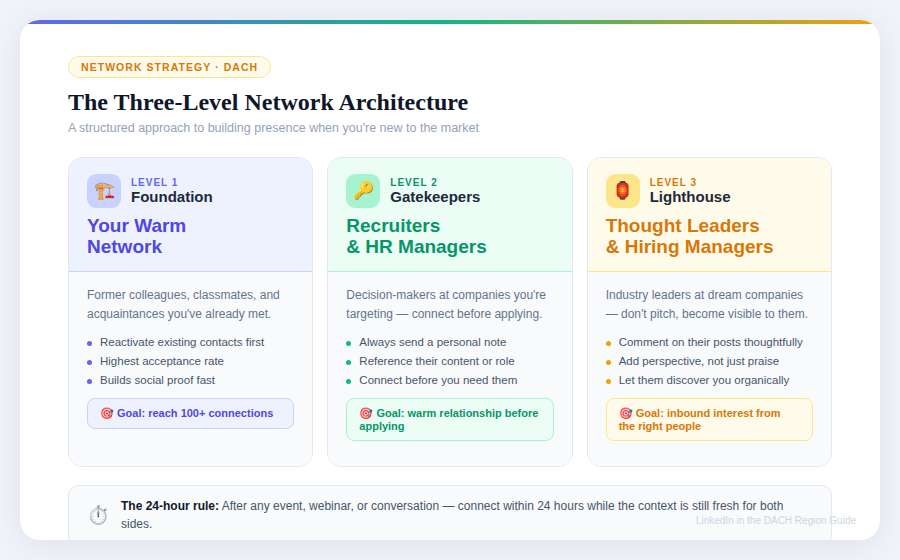
Level 1 – Your Foundation:
Former colleagues, classmates, industry acquaintances. These are your first connections – reactivate them.
Level 2 – The Gatekeepers:
Recruiters and HR managers at companies that interest you. Connect – not with a blank request, but with a short personal message.
Level 3 – The Lighthouse Contacts:
Industry leaders, thought leaders, hiring managers at your target companies. Here it’s not about direct networking, but about becoming visible: comment on their content, engage with their perspectives, show your viewpoint.
How to Write a Connection Request
No blank requests. Always include a personal message:
“Hi [Name], I’m currently looking for a role in [X] in Berlin. I found your post on [topic] very interesting and would love to stay connected.”
Short. Specific. Not copy-paste.
The 24-Hour Rule
After every offline event, webinar, or conversation: connect within 24 hours. The context is still fresh then – for both sides.
Groups and Events
Underused but effective. LinkedIn groups in your industry bring you together with active professionals. Events often open direct networking opportunities with speakers and organizers.
9. German or English – or Both?
This question comes up especially in international cities like Berlin or in Switzerland.
In German, if:
- You’re applying to traditional German Mittelstand companies
- The job postings you’re interested in are in German
- Your target clients or employers are primarily German-speaking
In English, if:
- You work or want to work at international companies or startups
- Your industry is globally oriented (tech, finance, marketing)
- You’re based in a highly international city like Berlin
Bilingual, if:
- You want to reach both markets
- You work in Switzerland or in international corporations
Important: don’t do both halfheartedly. One strong profile in one language is better than two mediocre ones.
10. Common Mistakes – Especially for Migrants
These are mistakes recruiters see every day:
- Profile in Russian, Ukrainian, or another native language – makes it unreadable for local recruiters
- No photo or a passport-style headshot – feels impersonal and outdated
- Headline = just a job title – no differentiation, no impact
- Experience listed as a task log – no results, no numbers
- “Dead” profile – no activity for months
- Fewer than 100 connections – looks like you’re just starting out, even if that’s not true
- Mass connection requests without a personal message – comes across as spam and is often ignored or reported
11. Psychology: Why We Keep Putting This Off
Many people know they should update their LinkedIn profile. And yet it doesn’t happen.
“I’m not good enough for LinkedIn.”
Yes, you are. You don’t need to be an expert with 20 years of experience. LinkedIn is also for people who are just getting started.
“What do I have to write about – I barely have any experience.”
Your perspective, your learning journey, your observations – that’s already valuable. No one expects completeness.
“I don’t want to come across as pushy.”
Professional networking is normal and expected in DACH. You’re not being pushy – you’re being proactive.
A small example: Someone rewrites only their headline – from “Marketing Specialist” to “Content & SEO Strategist | Helping B2B companies get found.” Two weeks later: the first InMail from a recruiter. Just from that one change.
12. Checklist: LinkedIn Profile in 13 Steps
Save this list and check things off:
- [ ] Professional photo (no selfie, no passport shot)
- [ ] Headline with value – not just a job title
- [ ] Keywords in headline, About section, and work experience
- [ ] About section: first 3 lines as a strong hook
- [ ] Work experience with results and numbers
- [ ] At least 1 recommendation
- [ ] 100+ connections
- [ ] Vanity URL customized
- [ ] Regular activity (posts or comments)
- [ ] Open to Work configured deliberately (visible to everyone or to recruiters only)
- [ ] “Add section” reviewed – projects, certifications, languages added
- [ ] “Featured” filled in – website, best article, or document pinned
- [ ] At least one LinkedIn article published with genuine expertise
FAQ
Should my profile be in German or English?
That depends on your target companies. International startups and tech firms expect English. Traditional Mittelstand companies and public sector employers prefer German. In Berlin, a bilingual approach often makes sense. Decide based on your target market – then be consistent.
What’s more important – XING or LinkedIn?
Clearly LinkedIn, as of 2025. XING is losing active recruiters and users, especially in the international segment. Anyone still exclusively on XING is missing out on the majority of relevant contacts.
How many connections do I actually need?
Under 100 makes a profile look thin – even if you have a lot to offer in terms of content. From 500 onwards, you’re seen as an active networker. Quality matters more than quantity, but quantity below a certain threshold does hurt your credibility.
Should I turn on “Open to Work”?
The green banner is visible to everyone – including your current employer. Use the “Visible to recruiters only” setting if you’re searching discreetly. If you’re openly between jobs or searching without any concern, the banner can help.
I don’t have much experience. Is LinkedIn still worth it?
Especially then. LinkedIn gives you the chance to show your intentions, interests, and potential – before an HR person even reads your cover letter. An active profile with 0 years of work experience is more valuable than an empty profile with 10 years of experience.
How often should I post?
Twice a week is the sweet spot. Comments on other people’s posts count as activity and often generate reach faster than your own posts.
Can I just message recruiters out of the blue?
Yes – and it’s perfectly acceptable in DACH. Keep the message short and specific. Even better: connect first, comment on one of their posts, then write. Warm contacts respond more often.
I’m getting no replies. What am I doing wrong?
The most common causes: no photo, a weak headline, or a profile with no activity at all. Recruiters click on a name – and if the profile looks empty and static, they close it again. Start with those three things.
Is LinkedIn relevant for non-technical careers?
Absolutely. Whether marketing, HR, law, healthcare, education, or trades – most industries are represented on LinkedIn. The depth of the network varies, but having a presence is worthwhile everywhere.
How long until I see results?
How long until I see results?
LinkedIn is not a sprint. Someone who is consistently active for 4–6 weeks – optimizing their profile, regularly commenting, connecting – will start to notice first responses. Those who just create a profile and wait… wait a long time.
Conclusion: You Exist – Now Let Yourself Be Found
LinkedIn is no longer a nice-to-have in the DACH region. It’s the most important career tool for anyone who wants to be visible – whether starting their first job in Germany, making a career change, or taking their next career step.
The good news: you don’t have to start perfectly. You just have to start.
Your first step for today: Open your profile and rework just your headline. One single, clear line – who you are, what you can do, what value you bring.
Everything else comes after that.
Do you have questions about your LinkedIn profile or want to know what you can specifically improve?
Book a free 20-minute session — we’ll analyze your LinkedIn profile together and develop concrete next steps for you.